
Demo Wizard is the Ultimate Store Sampling & Demonstration management software for Brick and Mortar Retailers and CPG Vendors.
Chat with us

Phone
Copyright © 2026 Demo Wizard
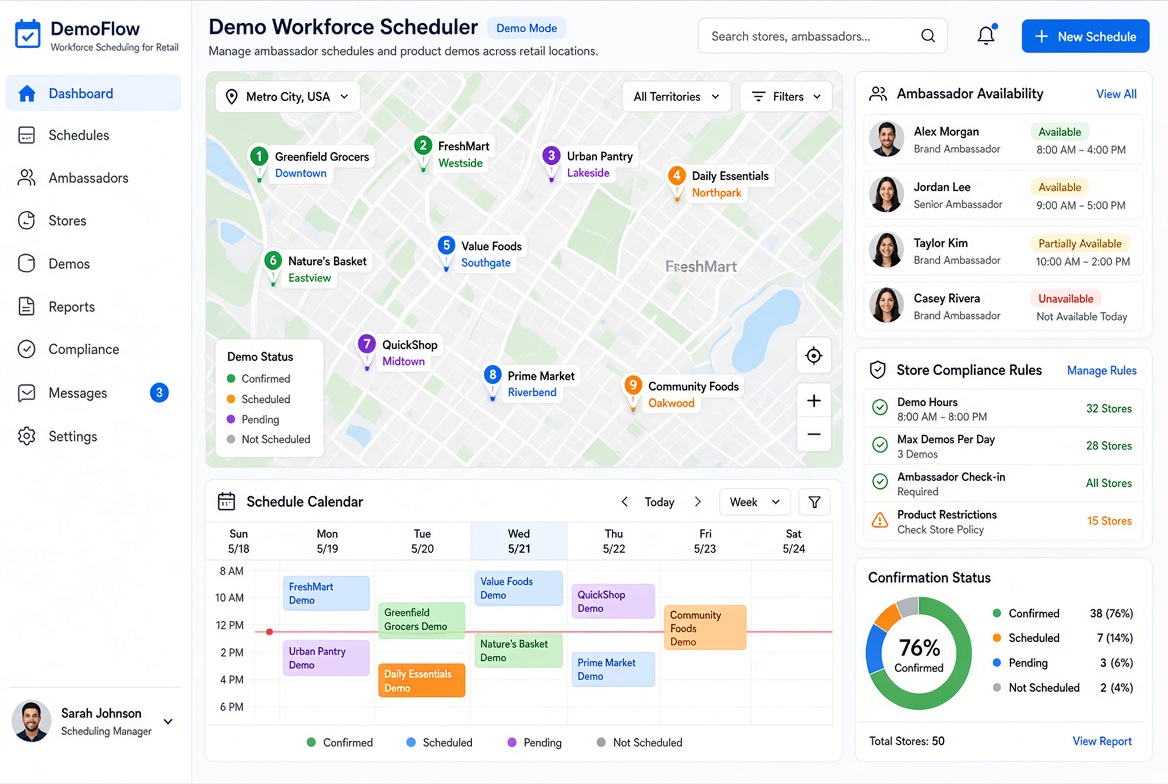
Demo workforce scheduling software helps CPG brands, retailers, and demo agencies coordinate brand ambassadors across multiple stores while reducing labor and administrative overhead. Automated scheduling matches staff to store locations, sends confirmations and reminders, checks retailer compliance requirements, and reduces no-shows, double-bookings, and manual communication. By connecting scheduled demos with store-level sales data, platforms like Demo Wizard also help brands measure sales uplift, evaluate campaign performance, and manage more activations without increasing administrative headcount.
Demo workforce scheduling refers to using automated systems to plan, assign, and track the brand ambassadors and demo staff who run in-store product demonstrations across many retail locations at once. Instead of a coordinator manually emailing stores and vendors to confirm each demo date, a scheduling platform matches available staff to open store slots, confirms compliance with each store's rules, and gives brands, retailers, and demo agencies shared visibility into every scheduled event. This matters because as the number of stores and SKUs grows, manual coordination becomes the main source of overhead, not the demos themselves.
Demo workforce scheduling coordinates people who don't work for the store or the brand directly, across locations owned by companies that aren't their employer. That single fact separates it from every standard scheduling problem built for one employer and its own payroll.
General shift scheduling assumes one company assigning its own employees to shifts it controls. A restaurant manager builds a schedule for cooks and servers who all report to the same business, work the same location, and follow one set of house rules. Broader workforce management platforms, like the tools described on Workforce.com, are generally built around this single-employer model.
Demo scheduling breaks that model. A brand ambassador might work for a staffing agency, get booked by a CPG brand, and show up at a grocery chain that has never employed them. The coordinator isn't managing fixed staff, they're matching independent or agency-employed ambassadors to open slots across dozens or hundreds of stores that belong to different retail companies entirely.
That means demo workforce scheduling has to reconcile three parties at once, not one:
General scheduling tools were never built to hold three sets of constraints in tension simultaneously.
Generic scheduling software tracks labor cost and shift coverage, it has no concept of store-level compliance rules, multi-retailer calendars, or sales impact. It can tell you who's clocked in, not whether a Saturday demo at a particular store actually moved product.
Demo events also behave differently than standing shifts. They're short, recurring, and scattered across many locations rather than fixed to one place five days a week, which changes how availability and assignment logic needs to work. A platform like Demo Wizard is built around that reality: it matches ambassador availability to store-specific slots, applies each retailer's rules automatically, and ties the resulting schedule to experience-to-purchase conversion data rather than labor hours alone. General-purpose optimization tools, like the scenario shown in Gurobi's workforce scheduling demo, illustrate how complex constraint-based scheduling can get even before store-level retail rules are added to the mix.
A centralized platform assigns ambassadors to stores based on availability and location, then automatically confirms, reminds, and reschedules without a coordinator touching a phone.
Demo workforce scheduling breaks down when it depends on someone re-keying the same event into a spreadsheet, a text thread, and a store manager's memory. A shared system removes that duplication by giving every party, brand, retailer, distributor, ambassador, one calendar to check instead of four separate ones.
A single shared calendar shows brands, retailers, distributors, and store managers exactly what's happening in every store, on every date, without anyone requesting an update. A retailer's regional manager can see all 40 demos scheduled across their stores this weekend in one screen, rather than waiting on emails from five different CPG brands. That same visibility supports compliance: arrival windows, table setup requirements, and food safety or sampling rules attached to each event get checked automatically against what's logged, flagging gaps before an ambassador ever walks in the door. Store employees stop being the ones who catch, and fix, a missed requirement on the spot.
Automation replaces phone tag and email chains with system-generated messages that go to the right person at the right time. When an ambassador is booked, they get a confirmation; when a store shifts a time slot, the ambassador and the brand's coordinator both get an alert without anyone drafting a message. Demo Wizard's scheduling engine builds this into the platform itself, generating reminders and reschedule notices automatically across every location a brand is running activations in, which is what allows one coordinator to manage hundreds of monthly events instead of hiring more staff to keep up with the calls. That same cross-location view also catches conflicts, two brands booked in the same aisle, or a gap where no demo is scheduled during a store's highest-traffic hours, before they cut into sales uplift.

Demo workforce scheduling done manually creates overhead that grows faster than the program itself, and it pulls store staff into work that isn't theirs. Fixing this is less about adding software and more about removing friction that compounds with every new SKU or store added. For more information, see Safeteam.
Automated scheduling moves confirmation calls, reschedule requests, and vendor check-ins off the store's plate and into a system both sides can see. A grocery store manager shouldn't have to field a phone call from a brand ambassador's agency to confirm a Saturday sampling slot, then relay that to a department lead, then follow up when the ambassador is running late. With a shared platform, the confirmation, the arrival window, and any changes live in one place that store staff can glance at rather than manage.
That shift matters because store employees are hired to run departments and serve customers, not coordinate outside vendors. Removing them from the back-and-forth means fewer interruptions during peak hours and no more time spent tracking down a distributor's rep to ask if someone is actually showing up.
Without a coordinated system, brands and retailers commonly run into a predictable set of problems:
The root problem is that manual coordination doesn't scale linearly. Each additional SKU, vendor, or location multiplies the phone calls, emails, and last-minute rescheduling rather than simply adding to a list. A brand running demos in 20 stores manages a manageable volume of coordination; the same brand at 200 stores faces a volume of communication that no single coordinator can track in spreadsheets alone. A shared calendar visible to brands, retailers, and ambassadors prevents these collisions before they happen, which is the operational problem platforms like Demo Wizard are built to solve.
Brands measure ROI by matching the exact demo date and location logged in the schedule against point-of-sale data from that same store and window. That match is what turns demo workforce scheduling from a logistics function into a measurement tool.
Tracking starts with the schedule record itself: which store, which SKU, which shift, which ambassador. Overlay that against unit movement or point-of-sale data for the same store on the same day, then compare it to a baseline period without a demo running. The difference is the lift you can attribute to that specific activation rather than to seasonality or a separate promotion.
This only works if the underlying execution was reliable. A demo that started two hours late, or an ambassador who never showed, breaks the link between the scheduled event and the sales window you're measuring against. Missed or delayed demos don't just waste ambassador payroll, they undercount true ROI, because the sales data reflects a demo that didn't actually happen as planned. Reliable scheduling is the precondition for a clean read on conversion, not a separate concern from it.
Sales lift is the headline number, but several qualitative signals confirm a program is on track:
Centralizing schedule and performance data across every store also reveals patterns a spreadsheet can't: which regions or store formats consistently outperform, and where future budget should go. Demo Wizard's analytics dashboard segments results by store and time period specifically so brand teams and retailers can make that call with data instead of instinct. This short overview of a workforce scheduling demo shows how a scheduling view can be organized to surface this kind of pattern.
The right platform for demo workforce scheduling centers on four capabilities: a centralized multi-location calendar, automated ambassador confirmations, store-compliance checks, and post-demo reporting tied to actual sales data.
Skip tools that treat demos as generic calendar events. A brand running 40 demos a month across three regions needs one view showing every location, every ambassador, and every confirmation status, not a spreadsheet stitched together from email threads. Automated confirmations matter because no-shows and last-minute cancellations are the most common reason demo days fall apart; a system that texts or emails ambassadors and flags unconfirmed slots 48 hours out catches problems before they become empty tables at the front of a store.
Compliance checks matter just as much on the retailer side. A platform that verifies an ambassador has the right certifications, follows the store's setup rules, and stays within assigned space and time reduces the friction that store managers otherwise absorb. Reporting should close the loop by connecting each demo event to sales lift at that store, during that time window, without that link, brands are back to guessing which activations were worth the spend.
Integration should focus on retailer and distributor data, store lists, planograms, promotional calendars, not on payroll or HR systems that a broader workforce suite would prioritize.
A general HR platform manages employee shifts and benefits; it has no concept of store-level compliance or experience-to-purchase conversion. A purpose-built tool like Demo Wizard is designed around the retail activation workflow specifically, which is why a narrow tool often outperforms an all-in-one suite for this job, it doesn't force brands to adapt demo logistics to a system built for something else.
Expect a phased rollout rather than a single cutover:
Rushing straight to hundreds of locations without the validation step tends to surface data-entry errors at the worst possible time.
Cost should be weighed against capability, not treated as a flat line item. Budget-friendly tools often cover basic scheduling and little else; mid-range and premium platforms typically add compliance tracking, ambassador payroll integration, and ROI reporting, the features that let one coordinator manage volume without adding headcount.

No, these tools work alongside HR and payroll systems, not in place of them. Demo Wizard, for example, handles ambassador compensation tied to completed demos, but it's built for scheduling and campaign coordination, not for managing a retailer's core employee records, benefits, or general payroll.
It varies by relationship, but coordination usually falls to whoever manages the ambassador workforce, often the brand's activation team or a demo agency. Retailers typically approve dates and store access rather than build the schedule. A shared, automated calendar keeps all three parties working from the same information instead of trading emails.
Yes, it works for both, though the value shows up differently. Independent grocers benefit from a simple calendar that keeps vendors from showing up unannounced, while chains use the same system to coordinate hundreds of events across many locations without adding headcount to manage it.
A scheduling platform coordinates who shows up and when; a tracking system records what happened afterward. Many platforms, including Demo Wizard, combine both, scheduling ambassadors across locations and then reporting on store-level performance and experience-to-purchase conversion so brands can see which demos actually drove sales, not just which ones took place.
Many teams notice a drop in phone calls and email volume within the first few scheduled cycles, since confirmations and reminders happen automatically. Clearer ROI signals, like sales lift tied to specific demos, typically take longer to show up, since they depend on having a baseline period and enough completed events to compare against.
Coordinating in-store demos manually caps how many events a brand or agency can realistically run, and it leaves retailers guessing about who's showing up and when. Three things matter most: a shared calendar that replaces email chains, ambassador management that scales without new hires, and ROI data that ties specific stores and time slots to sales impact. Platforms like Demo Wizard bundle these into one system, so a single coordinator can run hundreds of monthly events instead of dozens. Start by auditing how many hours your team spends weekly on scheduling logistics alone, that number usually makes the case for automating it.
Explore more from our content library:
About the Author
Written by the SaaS / Retail Marketing Technology experts at Demo Wizard. Our team brings years of hands-on experience helping businesses with SaaS / Retail Marketing Technology, delivering practical guidance grounded in real-world results.
Demo Wizard is the Ultimate Store Sampling & Demonstration management software for Brick and Mortar Retailers and CPG Vendors.
Chat with usPhone