
Demo Wizard is the Ultimate Store Sampling & Demonstration management software for Brick and Mortar Retailers and CPG Vendors.
Chat with us

Phone
Copyright © 2026 Demo Wizard
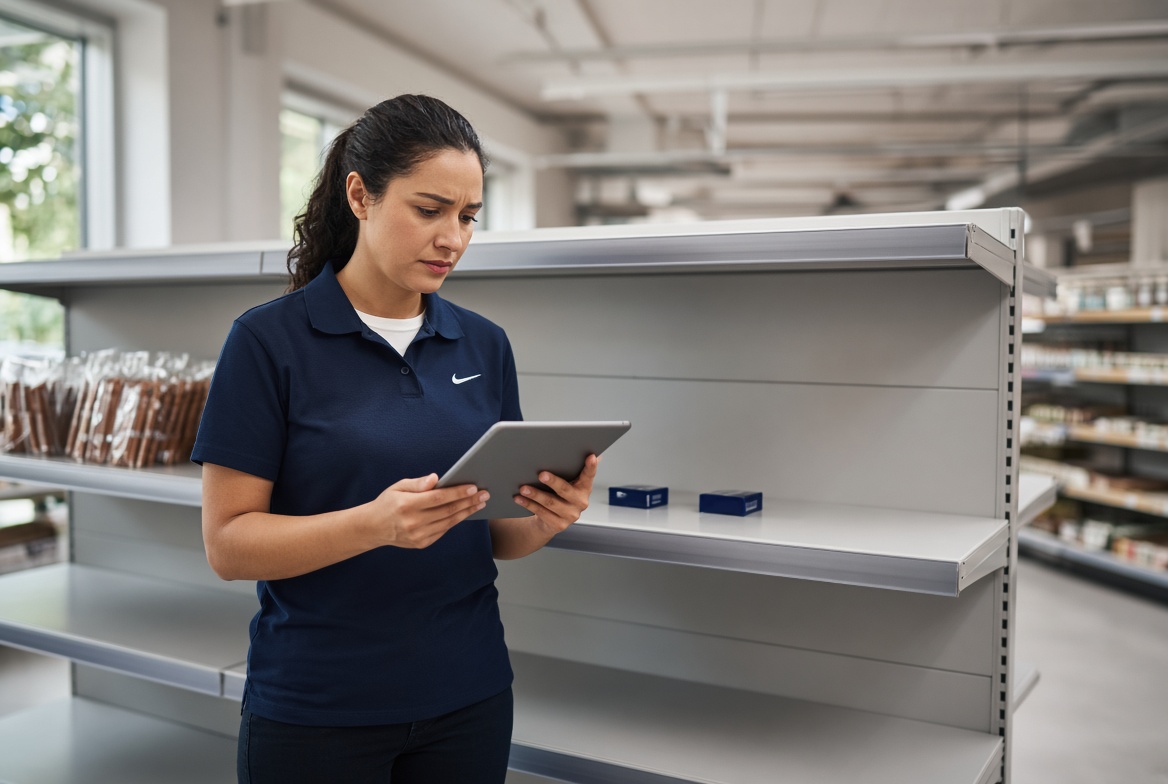
Understanding retail software to alert buyers of low inventory before in-store demos is essential. You verify demo product inventory by connecting your demo scheduling calendar to real-time stock data at the specific store location, so a threshold check runs automatically before a demo gets confirmed. If on-hand units fall below what's needed to run the demo and restock the display, the system flags it for rescheduling instead of letting a brand ambassador show up to an empty shelf. This matters because a cancelled or disrupted demo robs the ambassador of earnings, damages the brand relationship, and produces zero sales uplift. The ideal solution would be connecting two systems that traditionally never talk to each other: point-of-sale inventory and demo/event scheduling, but even stand-alone demo management systems that alert the replacement buyers of the upcoming sampling events are very uncommon.
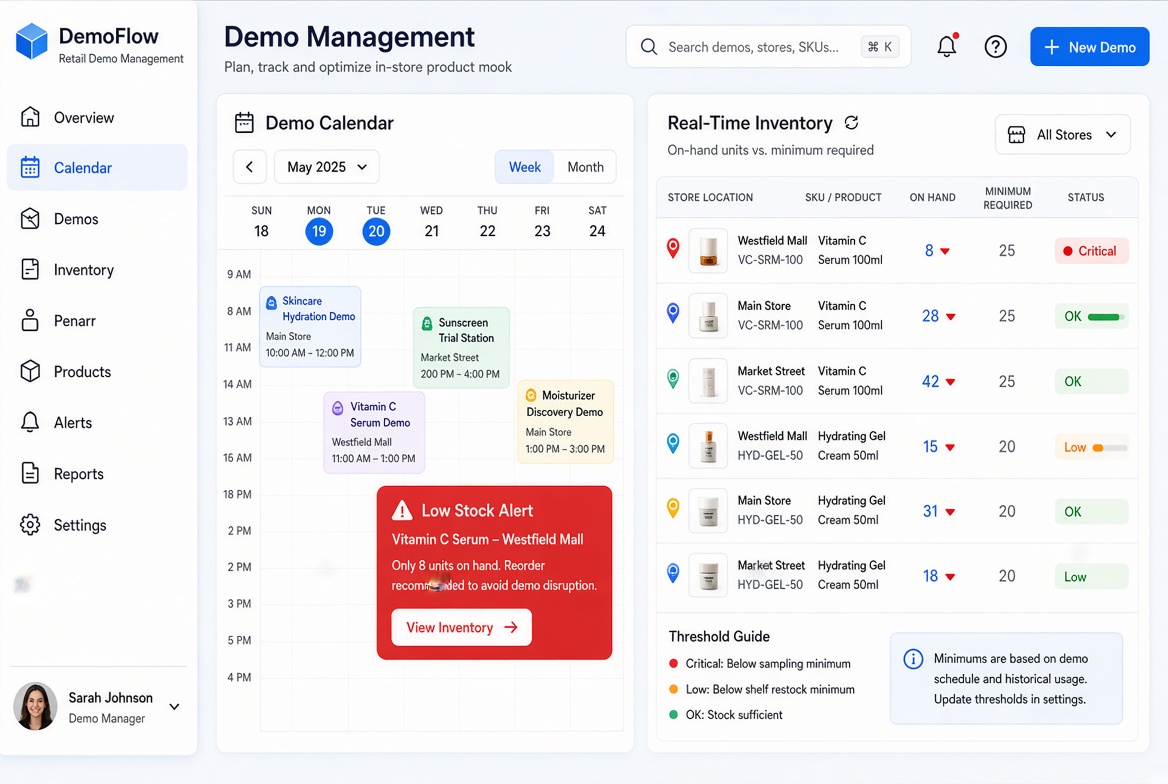
The mechanism runs in three steps: a demo request enters the system, on-hand quantity at that specific store gets checked against a minimum threshold, and the demo is either confirmed, flagged, or pushed to a new date. This type of system works by sitting between the scheduling calendar and the point-of-sale system, so the check happens automatically rather than depending on someone remembering to make a phone call. For a broader look at how these systems function across a retail operation, this retail inventory management software buyer's guide covers the foundational categories worth understanding first. This is particularly relevant for Retail software to alert buyers of low inventory before in-store demos.
The check has to run at the individual store SKU level. A distribution center or regional warehouse can show hundreds of cases in stock while the one store hosting Saturday's demo has three units left on the shelf. Aggregate inventory data hides exactly the problem a coordinator needs to catch, so the threshold logic only works when it's tied to that store's specific location code, not a regional rollup.
A threshold needs to cover two separate needs: units consumed as samples during the event and shelf stock left over to capture the purchase intent the demo just created. A demo that hands out 60 samples but leaves only 8 units on the shelf afterward converts poorly no matter how good the ambassador was. Setting the minimum threshold to account for both sampling draw and post-demo shelf presence is what separates a useful alert from a check that only prevents the ambassador from showing up to a literally empty shelf.
Most coordinators may confirm stock through phone calls or emails to store managers, then track responses in a shared spreadsheet. That process holds up for a handful of weekend demos. It breaks down once a coordinator is running dozens of activations a week across multiple states, because manual confirmation doesn't scale and store managers don't always respond before the ambassador is already en route. Retailers and brands looking to move past manual tracking can see how automated stock alerts are handled in point-of-sale systems more broadly in this discussion on low-stock alerts within a point-of-sale platform.
This verification step is a coordination layer, not a replacement for warehouse-wide inventory management. It answers one narrow question at one specific location before a demo gets locked in.
A demo only works if the shelf can deliver on the sample. Stale stock data breaks that chain the moment a shopper reaches for the product and finds an empty peg.
A product demonstration compresses the sales cycle into a single moment: a shopper tastes, smells, or tries something and walks, often within seconds, toward the shelf to buy it. That immediacy is the entire value of sampling. But if the number a coordinator saw when booking the event no longer matches what's physically on the shelf, the brand has spent ambassador hours and product cost manufacturing demand it cannot fulfill. This is precisely why closing the gap between what a spreadsheet says and what a shopper actually finds matters so much for demo performance.
Connecting point-of-sale or store inventory feeds directly to a demo scheduling platform replaces guesswork with a live stock check at the moment a demo gets booked. Instead of relying on an end-of-day export or a weekly count sent by a store manager, the scheduling system pulls current on-hand counts from the retailer's inventory data and flags any location where stock has dropped below what a demo requires. That sync doesn't need to run every second, it needs to run often enough that the number a coordinator sees at 9 a.m. still holds true when the ambassador sets up the table at 11. This overview of how retail software improves inventory management lays out the mechanics of that kind of data sync in more depth.
When a demo proceeds despite thin shelf stock, ambassadors still do their job, engaging shoppers, building interest, and prompting a purchase decision, but there's nothing left to buy. The activation spend, the ambassador's hourly pay, and the sampled product all get consumed with no corresponding sale, which depresses the experience-to-purchase conversion rate a brand uses to justify the campaign to finance.
Nightly batch syncs tell you what was true yesterday, which is nearly useless for a demo happening in six hours. Hourly or event-triggered updates, refreshing when a sale, delivery, or transfer occurs, give coordinators a picture close enough to real time to reschedule or reroute product before the ambassador arrives. This is narrower than fleet-wide inventory management: the goal isn't tracking every SKU across every store continuously, it's confirming, at the exact moment of scheduling and execution, that this store has enough of this product for this demo.
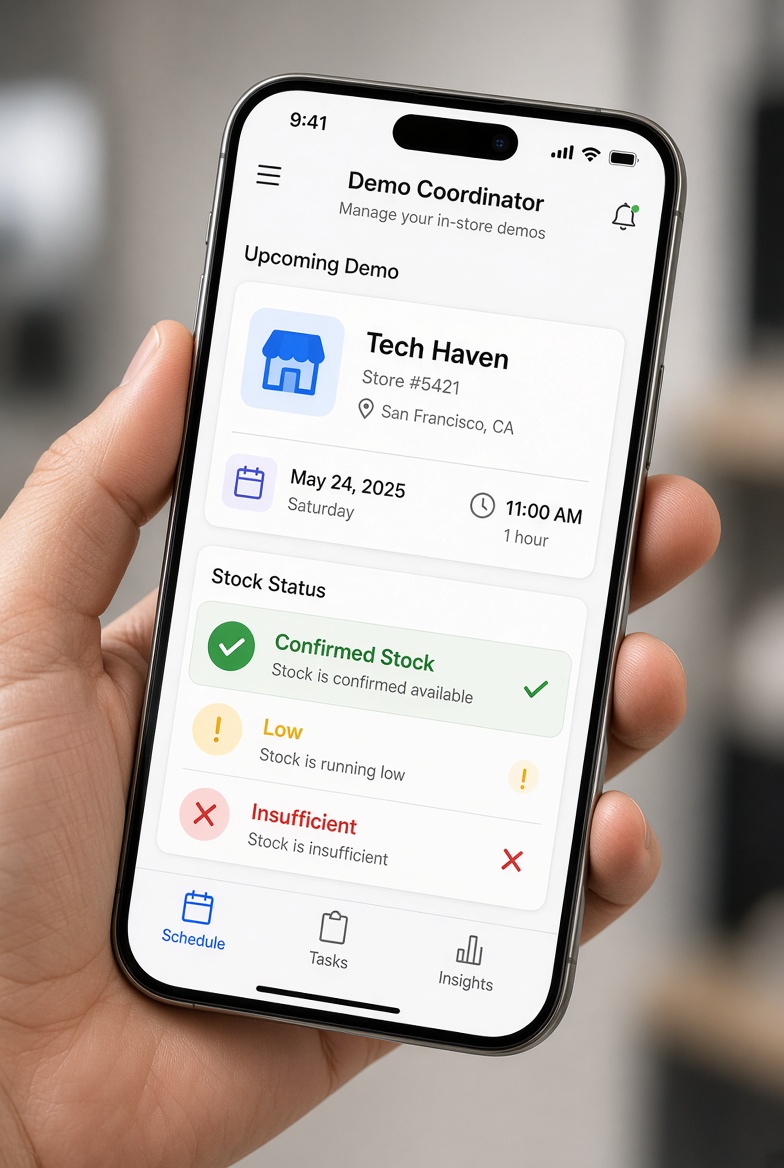
Ambassadors should confirm stock status through their own check-in screen, not by asking a store employee, before they set up a single sample table. For more information, see Service As Software Back Office.
A practical version of this looks simple on the surface. The ambassador opens the day's assignment on a phone, sees the store location and time slot, and next to it, a stock status indicator, green for confirmed, yellow for low, red for flagged as insufficient. That indicator draws on whatever inventory signal the coordinator has connected, whether that's a distributor feed or a manual pre-check logged earlier in the week.
Placing this check inside the ambassador's own workflow matters more than it sounds. If the only way to confirm stock is to track down a stock clerk or department manager, that's an interruption the store didn't ask for, on top of whatever else that employee was doing. A system like this works precisely because it moves that verification step off the store's shoulders and onto a screen the ambassador already checks before setup.
Escalation still needs a path. If an ambassador arrives and shelf stock looks thinner than the system indicated, the fastest fix is a quick-report button that flags the coordinator immediately, not a phone call routed through three people. The coordinator can then decide whether to shorten the demo, adjust timing, or reschedule, without pulling a store associate into the conversation.
This is about giving field staff visibility into product availability, not a tool for messaging or engaging individual shoppers.
Three connection points determine whether this kind of system can do its job: store-level SKU data, a shared calendar, and a threshold-triggered alert rule engine.
Without those three working together, a brand still finds out about a stockout from an ambassador standing in an empty aisle rather than from a system flag sent days earlier.
The essential building blocks break down into a few core pieces: When considering Retail software to alert buyers of low inventory before in-store demos, this point stands out.
Store-level SKU data: the system needs to know inventory counts per location, not just aggregate warehouse totals, because a demo scheduled at one store is meaningless if that specific location is short on product
A shared calendar: visible to the store, the brand, the distributor, and the agency staffing the ambassador, since when only one party holds the schedule, the other three are working from blind spots
A threshold-triggered alert rule engine: compares scheduled demo dates against projected stock levels and flags a gap automatically, instead of relying on someone to notice
Flexible data ingestion: the platform needs to accept both API feeds and file-based exports without custom engineering for every retail partner
Role-based permissioning: store staff should see inventory and schedules relevant to their own location, not a national dataset that invites confusion or errors
On build-versus-buy, a custom integration built in-house gives control but demands ongoing engineering time to maintain as retailer feeds change. A purpose-built demo coordination tool, Demo Wizard connects scheduling and store-level performance data without requiring a brand to build its own pipeline, shifts that maintenance burden off the brand's team. Generic alternatives, like a general IT support provider patching together spreadsheets, or an all-in-one retail suite not built for demo logistics, tend to leave gaps at exactly the connection points that matter most.
Measure it by comparing three things over time: cancellation rate, demo-day sales lift, and the labor cost tied to each wasted event. Together they show whether stock verification is paying for itself.
Start with the cost mechanism of a cancelled demo. An ambassador is typically paid whether the demo happens or not, the product allocation for that event is already committed, and the store slot itself, often booked weeks in advance and competing with other vendors for the same end-cap or table, is lost entirely once the window passes. That's three sunk costs stacked on top of each other, and none of them show up cleanly on a standard P&L line labeled "demo cancellations."
Build an internal benchmark by comparing demo-day sales lift between events where stock was verified beforehand and events that proceeded despite low or uncertain inventory. This is not a citation from an outside study, it's a comparison a brand or agency can build from its own historical demo data, store by store. Brands running this kind of verification process can pull this comparison directly from scheduling and sales records rather than estimating it.
Three metrics matter most in that internal review:
Reschedule rate: how often a demo has to be moved after the ambassador is already assigned
Ambassador utilization: the share of paid demo hours that result in a completed, product-available event
Sell-through in the days following a demo: whether verified-stock events correlate with steadier post-demo sales compared to demos run on thin inventory
Tracking cancellation rate before and after adding a verification step turns into a leading indicator, it moves faster than conversion data and flags problems before a quarter's ROI report does.
For retailers, the same tracking shows fewer wasted vendor visits and less staff time spent fielding reschedule calls from CPG brokers and brand ambassadors.
Responsibility usually splits three ways, which is exactly why manual checks fail so often. The brand or its broker confirms product was shipped, the retailer confirms it's on the shelf or in the backroom, and the brand ambassador does a final visual check on arrival. A shared, automated view removes the guesswork about who checked what and when.
Yes, a demo can proceed with reduced stock if the coordinator adjusts expectations and sampling pace ahead of time. The bigger risk is running out mid-shift with no warning, which is why flagging low inventory before the event matters more than the exact quantity on hand.
Most brands verify stock two to three days before the event, with a second check the morning of the demo. This window gives enough time to reroute product, adjust the order, or reschedule the ambassador if a store is genuinely out of stock, without checking so early that shelf conditions change.
Yes, though perishables need tighter timing since shelf life limits how far in advance a check is useful. A three-day-out check for dairy, produce, or bakery items can be outdated by demo day, so brands running frequent food and beverage activations typically pair the pre-demo check with a same-day confirmation from the ambassador before the table goes up.
General inventory alerts track reorder points across an entire store, while demo-specific checks confirm one SKU has enough stock at one location for one scheduled event. A store's overall inventory system might show a product as "in stock" while the specific case needed for Saturday's sampling event is still in transit or sold through. Demo Wizard's scheduling workflow is built around that narrower, event-level question rather than store-wide stock management.
Canceled demos almost always trace back to the same gap: nobody owned the question of whether product would actually be on the shelf on event day. Closing that gap doesn't require a full inventory management system, it requires a scheduling process that checks stock at the SKU and store level a few days out, then again the morning of the event.
Start with your next 30 days of scheduled demos. Pull the list, cross-check each store against current stock, and flag anything uncertain before an ambassador shows up to an empty shelf.
Explore more from our content library:
About the Author
Written by the SaaS / Retail Marketing Technology experts at Demo Wizard. Our team brings years of hands-on experience helping businesses with SaaS / Retail Marketing Technology, delivering practical guidance grounded in real-world results.
Demo Wizard is the Ultimate Store Sampling & Demonstration management software for Brick and Mortar Retailers and CPG Vendors.
Chat with usPhone