
Demo Wizard is the Ultimate Store Sampling & Demonstration management software for Brick and Mortar Retailers and CPG Vendors.
Chat with us

Phone
Copyright © 2026 Demo Wizard

A demo recap report is the summary document created after an in-store product demonstration that ties execution details—attendance, units sold, samples distributed, photos, staff notes—back to sales uplift and is the foundation for tracking campaign ROI. CPG brands use it to prove whether an activation was worth the spend; grocery retailers use it to confirm vendors followed store rules and didn't disrupt operations. Without one, demo results live in scattered texts, spreadsheets, and memory, making it impossible to compare performance across stores or brand ambassadors.
A this method closes the loop between a scheduled in-store event and the business decision to repeat, adjust, or cancel it next cycle.
Every activation follows a chain: a brand schedules a demo at a specific store, an ambassador executes it, that execution generates data, the data becomes a recap document, and the recap feeds a sales uplift analysis that determines whether the campaign earns budget again. Skip any link in that chain, and the brand is guessing rather than deciding.
This document is one of the key records that translate what happened on the sales floor into numbers a finance team can act on. It captures attendance, units sold during the event window, the number and cost of samples distributed, ambassador notes and travel expenses, and often photos of the table setup or shelf conditions. Analysts then compare that data against baseline sales for the same store and day part to calculate lift, and that lift figure becomes the input for the next spend decision. Platforms like Demo Wizard structure this handoff directly, pulling scheduling and execution data into ROI metrics tied to sales impact by store and time period, rather than leaving a coordinator to reconcile spreadsheets by hand.
This kind of report is scoped to one activation, one vendor, one product, one store, and one date, not aggregate store or category performance. General retail analytics answer questions like "How did the beverage aisle perform this quarter?" A recap answers a narrower question: How did this specific sampling event, run by this ambassador, on this Saturday morning, move product? That specificity is what makes it useful for both sides of the transaction. CPG brands need it to justify ambassador wages, sample costs, and travel expenses to internal stakeholders who control next quarter's activation budget. Grocery retailers need the same document for a different reason: to confirm the vendor honored the agreed time slot and floor space, followed store policies, and didn't disrupt checkout lines or other departments. Without a standard format, that proof scatters across texts, emails, and paper forms, and comparing performance across dozens of stores becomes guesswork instead of analysis.
A useful recap document tracks three categories together: sales-impact numbers, operational compliance, and ambassador performance, never sales alone.
Units sold during the demo window is the starting point, but it means little without the context around it. The core figures worth pairing together include:
Units sold during the scheduled demo window
Number of samples distributed to shoppers
Sample-to-purchase conversion rate
Basket lift on related SKUs, did shoppers who tried the product also buy the chips, mixer, or side dish typically paired with it
These numbers together answer the question a brand's finance team actually asks: did this specific event, at this specific store, on this specific day, move product. A report that lists only "units sold" without conversion context invites brands to keep funding low-performing store slots simply because the topline number looked acceptable.
Operational fields confirm the event happened the way it was supposed to happen. These typically include:
Verified check-in and check-out time against the scheduled window
Setup compliance, such as table placement, signage, and correct temperature holding for food and beverage items
Photo documentation from the ambassador on-site
Example of comments made by the engaged shoppers about their product experience
Example of comments made by the store personnel
Food and beverage demos carry compliance requirements that dry goods or beauty demos don't: cold-holding and hot-holding temperature logs, expiration date checks on sampled product, and allergen signage posted at the table. A store can face a health department citation over a demo that "ran successfully" by sales metrics but skipped a temperature log, which is exactly why these fields belong in the same document as revenue data, not a separate compliance form nobody reads.
Ambassador performance rounds out the picture: attendance reliability, adherence to script or talking points, and manager or shopper feedback captured on-site. A brand that only measures sales risks crediting a demo where the ambassador showed up late, skipped the signage, and still moved a few units by luck of foot traffic. Combining sales and compliance metrics in one report stops that over-crediting before it shapes next quarter's store selection.

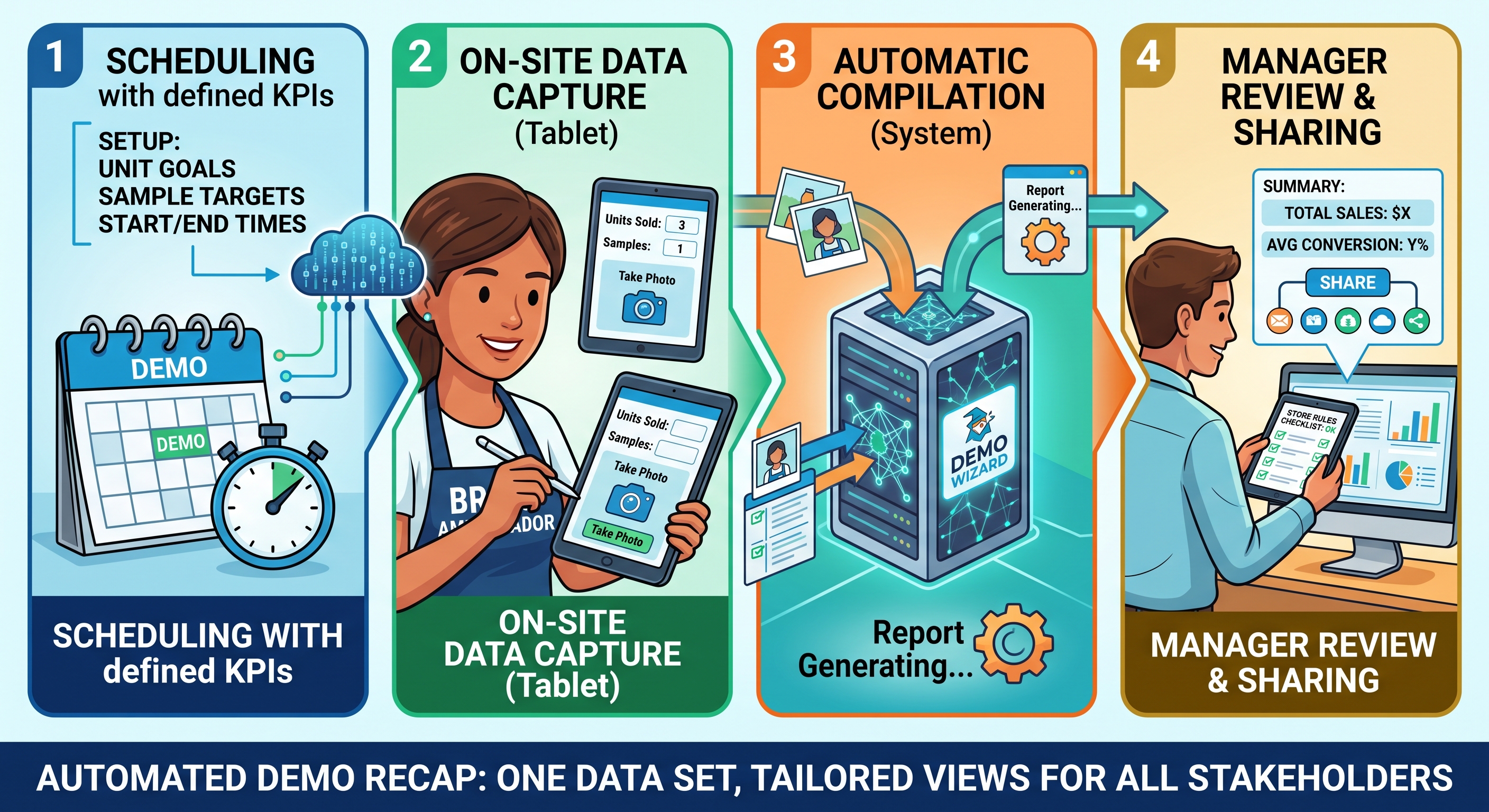
A this strategy is built by connecting four steps into one system: scheduling with defined KPIs, on-site data capture, automatic compilation, and manager review.
The process starts before the ambassador ever walks into the store. A coordinator schedules the demo and attaches defined KPIs, units sold, samples distributed, target conversion rate, so the report has a benchmark to measure against later.
On the day of the event, the ambassador logs check-in time, sales counts, and photos directly from the store, usually through a mobile interface. That data flows straight into a central report template instead of sitting on a clipboard. The brand manager or trade marketing lead then reviews the compiled document and shares it with retail partners or finance. For more information, see Senejac.
Compare that to the manual version most teams still run: paper sign-in sheets, a text message to a coordinator confirming the demo happened, and someone reconstructing a spreadsheet days later from memory and photos buried in a group chat. Each handoff is a place data goes missing or gets recorded inconsistently. Purpose-built templates provide a standardized structure that can keep fields consistent even before full automation is in place.
Automation removes store staff from the reporting chain almost entirely. Employees no longer chase down paperwork, track a vendor's arrival, or relay status updates by phone between the brand, the distributor, and the ambassador, the platform handles those handoffs instead.
A centralized calendar visible to the store, brand, and distributor prevents double-booked demo slots and closes the gap where recap data used to go missing after an event. Demo Wizard builds this coordination and reporting into one system, so a single coordinator can track hundreds of monthly events without hiring more staff to manage the paperwork.
Because every demo feeds the same template, fields stay standardized, same KPIs, same structure, every store, every time period. That consistency is what makes store-to-store and month-to-month comparisons meaningful rather than a patchwork of differently formatted spreadsheets.
The best recap document pulls from one data set but reformats the output by role, because a brand manager and a store manager are looking for different proof points.
A CPG brand manager reads a recap looking for a return-on-investment case. That means uplift versus baseline sales, cost per demo, and a trend line comparing performance across stores or regions. This is the view that decides where next month's activation budget goes—more Saturdays at the higher-converting stores, fewer at the ones that underperform.
A grocery retail operations team wants a different answer from the same event: did the vendor follow the rules. The version they need is compliance-forward—did the ambassador show up during the approved window, was the sampling table cleared and the floor left clean, and did the activation pull staff away from their own duties. None of that shows up in an ROI chart, and none of the ROI detail belongs in a compliance checklist.
Distributors and agencies sit between these two audiences and usually need both views stitched into a single source, filtered by who's opening it. A distributor reports uplift to the brand that hired them and compliance to the retailer hosting the event—same demo, two lenses.
A concrete example makes this clear: one Saturday food demo generates a single record in Demo Wizard, but the brand manager opens an uplift chart showing conversion against baseline sales, while the store manager opens a compliance checklist confirming table setup, cleanup, and staff disruption—both pulled from the same underlying event.
Sending one generic PDF to every recipient is why recap data gets ignored. Structuring the output by role is what gets it read and acted on.
A dedicated demo coordination platform automates recap generation by pulling scheduling data, ambassador check-ins, and on-site notes into one output, no spreadsheet compiling required.
This is a distinct software category from generic project-management or event-ticketing tools. Platforms built for retail activation handle the specific mechanics of in-store demos, including:
Assigning ambassadors to time slots across many store locations
Tracking whether an event actually happened as scheduled
Capturing what occurred at the table, such as units sampled, stock issues, and foot traffic observations
A general-purpose calendar or task tool has no concept of any of that. For context on how structured reporting interfaces look in other business domains, tools like these ASP.NET MVC reporting demos show the kind of dashboard and template flexibility that dedicated reporting software can offer, even outside the retail activation space.
The category works by linking three functions that are usually siloed: the schedule, the on-site execution, and the resulting report. A shared calendar gives both the retailer and the vendor visibility into what's booked at a given store, so a store manager isn't caught off guard by a vendor showing up unannounced. Brand ambassadors capture data on-site, arrival time, photos, sales notes, through a mobile check-in rather than a follow-up email. That captured data then assembles automatically into the recap document, rather than requiring a coordinator to chase down ambassadors and paste results into a document after the fact.
Demo Wizard fits this category directly. It connects scheduling, ambassador check-in, and recap reporting for CPG brands, retailers, demo companies, and agencies coordinating in-store food and beverage activations, generating post-demo analytics on experience-to-purchase conversion by store and time period without a coordinator manually compiling results from each location.
Worth stating plainly: this is a coordination and reporting tool for brand ambassador activity, not a consumer messaging or shopper communication platform. It doesn't track or contact individual shoppers.
When comparing options, weigh ease of ambassador adoption, retailer-side visibility, and reporting depth over price alone, per-demo and per-location costs vary by scale and contract, so qualitative fit matters more than a sticker price.
At minimum, the brand's activation manager, the retailer's store or category contact, and the demo company or agency that staffed the event should all receive a copy. Trade marketing directors and finance teams often need the same document to justify spend and shelf-space negotiations. When one report serves all three audiences, nobody has to chase separate updates.
Within 24 hours of the event, while ambassador notes and sales counts are still accurate. Waiting longer risks losing details about foot traffic, stockouts, or store conditions that affected results. Same-day submission also lets coordinators flag problems before the next scheduled demo at that location.
Yes, recap data compared across locations and ambassadors reveals patterns a single report can't show. A store with consistently low conversion despite good foot traffic may have a placement or staffing issue, while an ambassador with lower numbers across multiple stores may need retraining. Demo Wizard's performance insights surface these patterns automatically by segmenting results by store and time period, rather than requiring someone to compile spreadsheets manually.
Photos aren't strictly required, but they add proof that's hard to dispute in retailer conversations. A shot of the table setup, signage, and stock levels confirms compliance and gives category managers visual evidence alongside the sales numbers. Most retailers now expect at least one image per event.
The retailer typically flags the violation and may restrict that vendor's future access to the location or chain. Common issues include exceeding footprint boundaries, ignoring sampling permits, or leaving the area unclean. A documented recap protects the store from liability and gives the brand a factual basis to retrain or replace the ambassador involved.
This approach only earns its place in the workflow if someone reads it, acts on it, and compares it against the next hundred events. The real value shows up when this data rolls up across stores and time periods, that's what separates a filing exercise from a tool that improves conversion. Start by auditing your last 10 recap documents: if you can't quickly answer which store and which ambassador performed best, your current process is producing paperwork, not insight. Fixing that gap is the next step worth taking.
Explore more from our content library:
About the Author
Written by the SaaS / Retail Marketing Technology experts at Demo Wizard. Our team brings years of hands-on experience helping businesses with SaaS / Retail Marketing Technology, delivering practical guidance grounded in real-world results.
Demo Wizard is the Ultimate Store Sampling & Demonstration management software for Brick and Mortar Retailers and CPG Vendors.
Chat with usPhone