
Demo Wizard is the Ultimate Store Sampling & Demonstration management software for Brick and Mortar Retailers and CPG Vendors.
Chat with us

Phone
Copyright © 2026 Demo Wizard

Demo staff cancel at the last minute mostly because confirmation depends on someone remembering to call or text a day or two beforehand, when that step is manual, it slips, and store managers find out there's no ambassador only when the table stays empty. A demo staff confirmation workflow fixes this by automatically requesting, collecting, and escalating confirmations well before the shift, so unconfirmed slots surface early enough to find a replacement instead of after the demo has already failed.
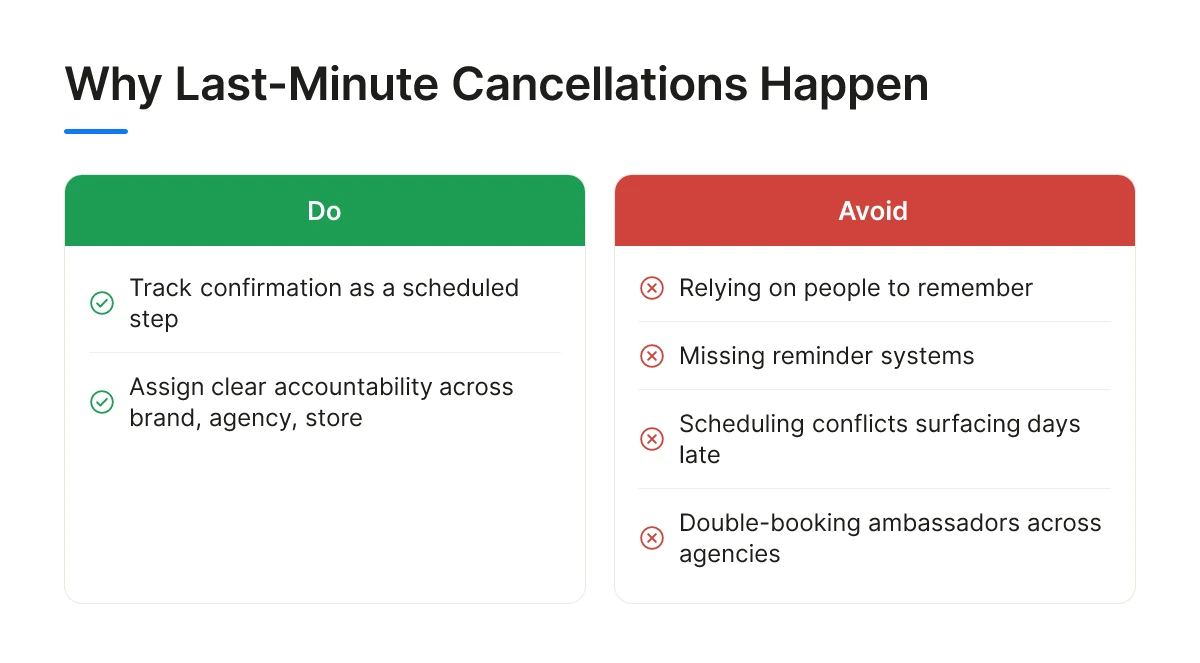
Last-minute cancellations happen because confirmation sits on no one's calendar as a tracked step, it relies on a person remembering, and people forget. Four causes repeat across brand, agency, and retailer conversations: missing reminder systems, scheduling conflicts that surface days too late, ambassadors double-booked across competing agencies, and no clear line of accountability tying brand, agency, and store together when something goes wrong.
Double-booking is common in markets with a limited pool of trained ambassadors, especially around weekends when multiple brands want the same high-traffic time slots. Without a demo staff confirmation workflow that flags conflicts automatically, an ambassador can accept two shifts for the same Saturday and only realize the overlap the night before.
Manual confirmation, a coordinator calling or texting each ambassador individually, works fine for five stores a week and breaks down at fifty. Every phone call or unanswered text is a task someone has to track, follow up on, and re-attempt, and that overhead scales linearly with the number of shifts rather than shrinking with volume.
A coordinator running activations across dozens of locations in a given week cannot personally verify every ambassador's status by phone without the job consuming most of their schedule. That time pressure is exactly why confirmation steps get skipped under workload, not because anyone involved is careless.
The store absorbs the first hit. An employee discovers the no-show at setup time, not before, and has to improvise, pulling signage, reclaiming the table or end-cap space, and fielding questions from shoppers who expected a tasting that isn't happening.
The brand absorbs the second hit, and it's the one that can't be undone. Sampling volume lost on a specific day cannot be recovered later; the shoppers who walked past an empty table that Saturday are not coming back for the tasting that was supposed to happen. This matters most for weekend-dependent roadshow-style activations, where a single missed Saturday can represent a meaningful share of the entire event's planned sampling volume.
Compounding both problems is the absence of a shared, visible schedule. When there's no centralized calendar, the store manager, the distributor, and the brand's coordinator each learn about a canceled slot at a different time, often hours apart, turning one missed confirmation into three separate scrambles instead of one coordinated fix.
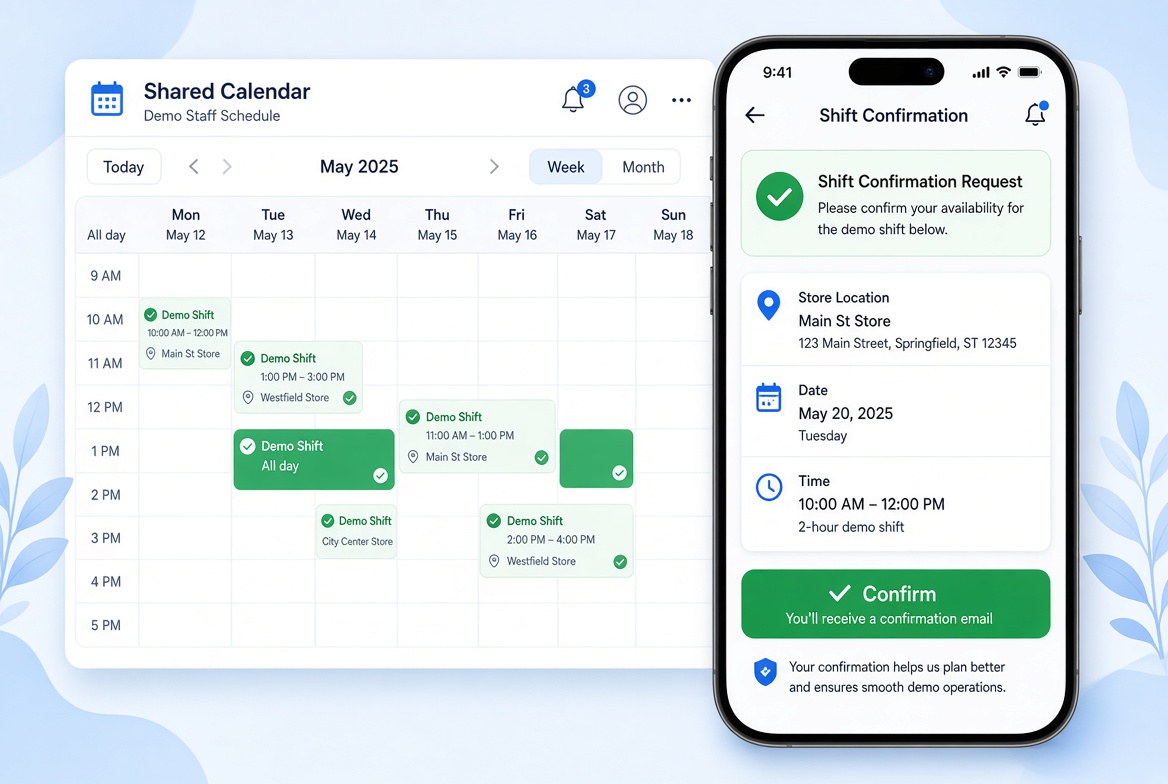
A demo staff confirmation workflow runs on triggers and timed follow-ups: it sends a request automatically, logs the response, and escalates on its own if nobody answers.
The mechanics matter more than the concept. A scheduling system that just posts a shift to a calendar and waits isn't a confirmation workflow, it's a hope. The difference shows up in what happens between the moment a shift gets booked and the moment the ambassador actually walks into the store.
The sequence starts the moment a shift gets scheduled. The system sends a first confirmation request several days out, enough lead time to find a replacement if needed, and a second request closer to the shift date, typically 24 to 48 hours before, as a final check.
The ambassador doesn't need to call anyone back. A single tap or reply confirms the shift, and that response gets logged against the shift record automatically, with a timestamp. No coordinator has to manually mark a spreadsheet cell or cross-reference a text thread. Platforms like Demo Wizard build this into the scheduling layer itself, so confirmation status updates the same record that tracks ambassador assignment, store location, and payroll, one shift, one record, no reconciliation step later.
Escalation is where automated workflows earn their keep. If an ambassador hasn't responded by a defined cutoff, say, 24 hours after the second request, the system flags the shift as unconfirmed and alerts the coordinator or agency immediately. That alert fires while there's still time to line up a replacement, not after the shift has already been missed.
Compare that to manual chasing, where escalation depends entirely on a coordinator noticing a text went unanswered. With dozens of shifts running across multiple states in a given week, that kind of monitoring is easy to miss until a store manager calls asking where the ambassador is [1].
This structure also removes the store manager from the loop entirely. Confirmation status lives on a shared calendar visible to the coordinator, the agency, and the retailer, not buried in a manager's inbox or a group text they weren't copied on. The manager sees a confirmed event on the calendar or doesn't; they're never the one responsible for chasing a reply.
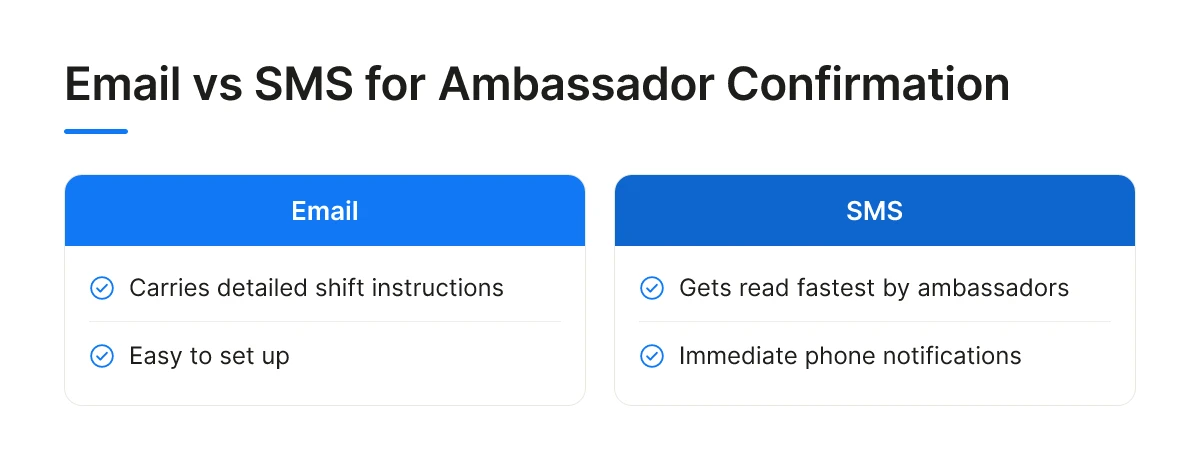
Each channel trades speed for detail: email carries instructions best, SMS gets read fastest, and in-app confirmation balances both while keeping a record. A demo staff confirmation workflow built on the wrong channel for your workforce will leak confirmations no matter how good the schedule looks.
Text messages get read faster than email for most ambassadors, simply because phones surface SMS notifications immediately while inboxes pile up unread. Email is easy to set up and works well for sending detailed shift packets, product talking points, parking instructions, photos of the display setup, but it's also the channel most likely to get filtered as spam or checked once a day instead of in real time. For a confirmation that needs an answer within hours, not by end of day, email alone is a weak link.
SMS fixes the speed problem but introduces a new one: it's a poor format for anything beyond a yes/no reply. You can't easily attach a store map, a product spec sheet, or a photo of the end-cap layout to a text thread without it turning into a cluttered, hard-to-reference mess.
In-app confirmation splits the difference. A single tap confirms the shift, and the same screen holds the store address, arrival time, product details, and the ambassador's history with that location or brand. That matters more as ambassadors take on work across multiple brands or agencies, a generic text doesn't tell them which client, which store, or which product line a shift belongs to, but an app does.
There's no single best channel, the right fit depends on who's on your roster and how connected they are. Ambassadors working rural routes with spotty data coverage may rely on SMS because it works on weaker signal. Ambassadors juggling several agencies tend to prefer an app that keeps every assignment in one place rather than hunting through texts and emails from different senders.
Practical demo staff confirmation workflows rarely pick one channel and stop. A common pattern layers them: in-app as the system of record for full shift details, with an automated SMS nudge as a backup reminder closer to the event date. That combination catches ambassadors who miss the app notification without losing the detail that email or in-app views provide.
Build a demo staff confirmation workflow that runs entirely between the platform, the agency coordinator, and the brand ambassador, so store managers never field a scheduling call. The grocery store's involvement should shrink to a glance at a shared calendar, not a phone conversation.
Grocery retailers lose value when confirmation logistics spill onto the sales floor. A manager pulled into a text thread with a distributor or a brand ambassador is a manager not managing checkout lines, stocking schedules, or customer service. The fix is structural: route every confirmation, reminder, and reschedule request through the coordinator and the ambassador directly, with the store positioned as a viewer of the outcome rather than a participant in the back-and-forth.
Yes, the design principle is pacing, not volume. A single, well-timed reminder sent close to the shift start does more to secure attendance than five reminders spread across a week, and it avoids the fatigue that makes ambassadors tune out notifications entirely. Reminder systems built for appointment-based businesses show the same pattern: cancellation and no-show prevention improves when communication is timed around decision points, not repeated on a fixed schedule regardless of whether the recipient already confirmed [3].
Stacked reminders also create a different failure mode. If an ambassador receives four identical pings, a real schedule conflict or last-minute swap request can get buried in the noise. One targeted nudge, triggered by confirmation status rather than a calendar countdown, keeps the signal clear.
A shared calendar works because the brand, the agency, and the store all look at the same record instead of three separate phone trees or spreadsheets. When an ambassador confirms, that status updates once and becomes visible everywhere, no manager has to call the distributor to ask whether Saturday's demo is still happening.
This visibility also supports in-store compliance. A confirmed, visible schedule lets the store verify ahead of time that a demo's footprint and timing fit the allotted space, without a manager fielding last-minute vendor calls to sort out table placement or aisle access. Platforms built for multi-location coordination, including Demo Wizard, generate this kind of shared view automatically as part of scheduling, which is what allows a single coordinator to manage events across many stores without each location needing its own point of contact.
Four numbers tell you whether a demo staff confirmation workflow is reducing disruption: confirmation rate, post-confirmation no-show rate, replacement lead time, and audit completeness.
Confirmation rate is the share of scheduled shifts that reach a confirmed status before your cutoff window closes. A single week's number means little, what matters is the trend across a quarter, by region, by agency, and by day of week. A coordinator running 150 monthly events across three states should watch whether confirmation rates dip on specific weekends or with specific ambassador pools, since that pattern usually points to a scheduling or communication gap rather than random chance.
No-show rate after confirmation is a separate metric, and conflating it with confirmation rate hides the real problem. An ambassador who never responds to a shift request represents a workflow failure, the system didn't reach them, or didn't escalate in time. An ambassador who confirmed and still didn't show represents a different issue: reliability, transportation, or a scheduling conflict that surfaced late. Fixing the first problem means tightening the confirmation process itself; fixing the second means adjusting ambassador selection or backup staffing [4].
Lead time to replacement measures how long passes between a shift getting flagged as unconfirmed and a replacement actually being resolved. A shift flagged five days out and filled within hours is a healthy system. A shift flagged the morning of the demo, with no resolution before doors open, is the scenario that leaves a table empty and erodes the retailer relationship that took months to build.
These numbers connect directly to revenue. Products featured in retail demos often sell more than 40% better than non-sampled items [1], but that lift only materializes when the demo actually happens. Every cancelled shift is a day of sampling volume the brand doesn't get back.
Keep a timestamped record of every request sent, every response received, and every escalation triggered. This record supports accountability conversations with agencies and brand partners without relying on anyone's memory of what happened three weeks ago. When a retailer asks why a scheduled activation didn't run, a documented trail settles the question in minutes instead of becoming a dispute.

No workflow removes no-shows completely, but a structured confirmation and backup process cuts them sharply. Illness, transportation problems, and scheduling conflicts still happen. What changes is lead time: a brand or agency learns about a gap 24-48 hours out instead of at the table, leaving room to activate a backup ambassador before the shift starts.
Yes, often more, independent grocers have fewer staff to absorb a vendor no-show. A single uncovered demo slot in a small store is more visible to the store manager and more disruptive to that day's foot traffic plan than the same gap in a large chain with more departments and staff to compensate.
A backup staffing plan should trigger automatically rather than relying on a coordinator to scramble by phone. Platforms like Demo Wizard track ambassador assignments against scheduled events, so a late cancellation can surface immediately to whoever manages that market, with alternate ambassadors already visible and available to slot in. Without that visibility, the store finds out when no one arrives.
Most operations send an initial confirmation request several days ahead and a second reminder 24-48 hours before the shift. The first request secures commitment early enough to find a replacement if needed; the second catches last-minute conflicts while there's still time to act on them.
Confirmation gaps turn into empty tables, frustrated store managers, and wasted product, but the fix isn't more phone calls, it's visibility. Build a two-stage reminder cadence (several days out, then 24-48 hours before), keep a backup ambassador list ready for every market, and make cancellations visible to everyone who needs to react, not just the coordinator who happens to check email first.
Demo Wizard builds this into its scheduling and ambassador management tools, so a single coordinator can track confirmations across hundreds of monthly events without chasing each one by hand. Start by auditing your last month of scheduled demos: how many had a confirmed replacement plan before the shift began?
Explore more from our content library:
About the Author
Written by the SaaS / Retail Marketing Technology experts at Demo Wizard. Our team brings years of hands-on experience helping businesses with SaaS / Retail Marketing Technology, delivering practical guidance grounded in real-world results.
Demo Wizard is the Ultimate Store Sampling & Demonstration management software for Brick and Mortar Retailers and CPG Vendors.
Chat with usPhone