
Demo Wizard is the Ultimate Store Sampling & Demonstration management software for Brick and Mortar Retailers and CPG Vendors.
Chat with us

Phone
Copyright © 2026 Demo Wizard

Managing in-store demo scheduling and tracking across multiple store locations rapidly fails when relying on spreadsheets, emails, and phone calls. Implementing a dedicated, shared platform aligns brand coordinators, store managers, and field ambassadors on a single schedule. Beyond simple attendance, effective tracking captures execution compliance, store-level sales velocity, and consumer feedback to turn field activations into measurable ROI.
Understanding demo staff scheduling and tracking is essential. CPG brands, retailers, and demo companies coordinate in-store demo staff by combining a shared calendar, standardized check-in/check-out tracking, and automated performance reporting across every store location. This replaces phone calls, spreadsheets, and disconnected emails with one visible schedule that store managers, brand ambassadors, and brand coordinators can all see and update. Effective tracking goes beyond attendance, it connects each demo event to sales velocity, photo compliance, and consumer feedback so brands and retailers can measure actual ROI, not just hours worked.
A single demo is easy to manage by phone or email. Coordinating demo staff scheduling and tracking across 10 or 200 stores a month is a different problem entirely, and it breaks down fast without a shared system.
Three groups need the same information at the same time: the brand coordinator booking the activation, the store manager hosting it, and the brand ambassador showing up to run it. In most organizations, each one works from a different tool. The coordinator keeps a spreadsheet, the store manager relies on a corporate memo or a verbal heads-up from a department head, and the ambassador gets a text message or a calendar invite that nobody else can see. When one piece of that chain goes missing, a store manager who never got the memo, an ambassador who double-books a Saturday, the demo either doesn't happen or shows up as a surprise to a store that wasn't prepared for it.
The core issue is that nobody has one view of the full schedule, so conflicts surface only after they've already caused a problem.
A coordinator working one or two stores can call the manager, confirm a table and a time slot, and follow up the morning of the event. That approach holds up fine at small scale. It collapses once a brand or agency is running dozens of activations in a week across different regions, because confirmations get buried in inboxes, phone calls don't get returned, and nobody notices a gap until an ambassador arrives to find another vendor already set up at the entrance. A centralized, shared calendar, visible to the coordinator, the store, and the ambassador at once, closes that gap. Everyone sees the same booked slot, the same store contact, and the same confirmation status, which prevents double-booked tables, conflicting events on the same day, and demos that land on a store's calendar unannounced.
Retailers protect their floor operations by requiring advance notice of exactly where, when, and how a demo will run before it's approved.
That typically means the retailer wants to see aisle or end-cap placement, the time window, and confirmation that staffing is locked in, well before the activation date. This lets store management plan around restocking, foot traffic, and other vendor activity instead of reacting to an ambassador who shows up unannounced. Retail and in-store demo guidance consistently frames scheduling and logistics as a core pillar of execution, not an afterthought, because timing and placement directly affect how well a demo performs [1]. Platforms like Demo Wizard build this visibility in from the start, giving store contacts, ambassadors, and brand coordinators the same schedule so approvals and confirmations happen before anyone sets foot in the store.
Five data points turn a demo shift into measurable proof: check-in confirmation, photo compliance, units sampled, shopper feedback notes, and sales velocity by store. Capture these consistently and demo staff scheduling and tracking stops being an administrative task and becomes the backbone of your ROI reporting.
Check-in confirmation: verifies the ambassador arrived at the right store, on time, for the full shift.
Photo compliance: confirms table setup, signage, and product display matched brand standards.
Units sampled: tracks how many shoppers actually tried the product during the shift.
Shopper feedback notes: captures reactions to taste, price, or packaging in real time.
Sales velocity by store: measures units sold per store per week against a baseline period.
Attendance confirmation is the starting point, did the ambassador check in at the assigned store, on time, for the full shift. Without that baseline, every other metric is unreliable, because you can't credit sales lift to a demo that didn't happen as planned.
Photo compliance comes next: ambassadors upload images of the table setup, signage placement, and product display to confirm the activation matched the brand's execution standards. Units sampled and consumer feedback notes capture what happened during the shift, how many shoppers tried the product and what they said about taste, price, or packaging.
Sales velocity reported by store rounds out the picture. Unlike ecommerce, brick-and-mortar retail doesn't have a meaningful "conversion rate", there's no clean funnel of site visitors to track against purchases. Instead, brand managers should watch sales velocity (units sold per store per week) and average transaction value lift during the demo window compared to a baseline period. These are the terms retail buyers and category managers actually use when evaluating whether a demo earned its shelf space.
Cost-per-demo is straightforward: add up the labor and execution cost for the shift, ambassador pay, product cost, any slotting or administrative fees, then divide by units moved or leads generated. No POS connection is required to run this calculation; it only needs accurate shift data and a sales figure for the demo window, whether that comes from the store, a distributor, or a broker report.
This is a deliberate design choice for platforms in this category. Demo Wizard ingests sales data from retailers or third-party providers rather than integrating directly with point-of-sale systems, which keeps setup simple for brands running activations across chains with different POS environments. The tradeoff is that sales figures arrive on whatever cadence the retailer or distributor provides, so brand managers should treat them as directional rather than real-time.
Industry data shows the stakes of getting this measurement right: products featured in retail and in-store demos often sell more than 40% better than non-sampled items [1], which makes accurate cost-per-demo tracking the difference between a program that looks expensive on paper and one that's clearly paying for itself.
Photo and compliance documentation does double duty beyond quality control. A time-stamped record of setup, staffing, and in-store conditions becomes the evidence trail brand managers bring to retail buyers when renewing shelf agreements or negotiating expanded placement, proof the program ran as promised, store by store.
Automated systems replace phone tag and spreadsheet updates with confirmations, reminders, and visibility that run without a person chasing each detail. That shift is the real mechanism behind effective demo staff scheduling and tracking, it reassigns hours of manual coordination to software that never forgets a follow-up.
Consider the typical failure point in manual coordination: a brand ambassador forgets a shift, a coordinator finds out the morning of the event, and then scrambles to find backup staff while the store waits. Automated confirmation sequences and reminder texts close that gap before it opens, cutting the no-show and last-minute call-out rate that otherwise forces reactive staffing decisions.
Every manual confirmation call, every reschedule, every conflict check against an existing calendar costs someone real time, a coordinator cross-referencing spreadsheets, a store manager fielding a vendor's phone call to verify a slot is still open. Multiply that by dozens of weekly events and the hours add up fast, even though none of that work touches the product, the sampling table, or the shopper. Automated platforms absorb these checks into the scheduling system itself, flagging double-bookings and confirming availability without a human in the loop for routine cases. A single coordinator manually tracking a handful of stores can keep up with phone calls and email threads; the same coordinator overseeing hundreds of monthly events across multiple states cannot, unless confirmation and conflict-checking work happens automatically. That contrast, a handful of locations versus a multi-state program, is where platforms like Demo Wizard change the math, letting one person manage scheduling and ambassador assignments across a full retail footprint without adding headcount.
Store staff have historically absorbed the coordination overhead that brands and agencies failed to handle themselves, answering vendor calls, approving last-minute date changes, and relaying messages between a brand ambassador and a regional manager who never speaks to each other directly. A centralized calendar visible to the brand, the agency, and the store removes that relay function entirely, since everyone checks the same schedule instead of calling the service desk. Automatic compliance checks reinforce the same effect: confirming the correct time window, the correct location, and required setup steps before an ambassador arrives means the retailer spends less time policing details on the floor. Retail and in-store demos already carry real sales upside, sampled products often sell over 40% better than non-sampled items [1], so protecting that lift by removing friction for store staff is not a minor convenience; it is what keeps retailers willing to host the next activation.
A platform built for demo staff scheduling and tracking needs five core pieces: a shared multi-location calendar, mobile check-in and check-out with geolocation or photo confirmation, compliance checklists tied to each event, self-service rescheduling, and dashboards every stakeholder can open directly.
These pieces solve different problems for different people. A brand activation manager needs to see 80 stores at once. A store operations lead needs to know who is walking through the door today. An ambassador in the field needs a way to flag a problem without waiting on hold. One system has to serve all three, or the coordinator becomes the bottleneck again, exactly the manual-spreadsheet problem that drains 15-plus hours a week from brand teams running dozens of monthly activations.
Compliance works best when it is built into the event record, not left to an ambassador's memory or a follow-up email.
In practice, that means a required photo upload of the finished display before the shift counts as complete, a standardized setup checklist that matches what that specific store's floor plan and aisle rules allow, and a time-stamped check-in that confirms the ambassador was physically on-site during the scheduled window. Attack! Marketing notes that products featured in retail and in-store demos often sell over 40% better than non-sampled items [1], a lift that depends on the demo actually happening as planned, with the right signage, the right setup, and the right person on the floor. Checklists tied to each event are what make that verifiable after the fact, rather than assumed.
Demo day runs on mobile, real-time visibility, not end-of-week reports.
A store manager should be able to open an app and see who is on-site right now, at that location, without calling a regional coordinator. An ambassador who discovers low stock, a broken sample table, or a missing cooler needs a way to report it the moment it happens, not after the shift ends. Field service platforms built around this kind of real-time dispatch and communication show the same pattern: fewer delays and fewer miscommunications when teams coordinate directly through the system instead of through calls and texts [2], a model also reflected in dedicated personnel and dispatch tools built for distributed field teams [2].
Self-service rescheduling and substitute-staff workflows matter for the same reason. When an ambassador can swap a shift or request a replacement inside the platform, the brand or agency isn't stuck fielding phone calls to patch a gap. And reporting should be open by default, brands, retailers, and distributors should each see performance by store and date without requesting a spreadsheet from someone else's inbox. Demo Wizard builds its scheduling and ambassador management around this model, giving every party a direct view into event status and conversion data rather than routing it all through one coordinator's calendar.
Match the tool to your event volume, not your headcount, a brand running four demos a month needs something very different from one running 400.
A CPG brand testing a new product with occasional single-store demos can often manage with a shared calendar and a few phone calls. But the moment a brand starts running recurring programs across multiple chains, think biweekly activations in 30 stores spanning three retailers, manual coordination breaks down fast. Spreadsheets don't flag ambassador conflicts, and nobody notices a no-show until the store manager calls asking where the demo table went. This is the point where dedicated demo staff scheduling and tracking software earns its cost: it scales with the number of events you run, not with how many people you hire to manage them. Teams evaluating options more broadly may also find it useful to review general guidance on how to find the best staff scheduling software before narrowing in on a demo-specific platform [3].
Expect three broad cost tiers, and expect them to track event volume and reporting depth rather than user seats:
Budget-friendly: suits a brand running a handful of demos monthly in a single region, with basic scheduling and simple check-in confirmation.
Mid-range: fits a growing program across several retail chains, adding ambassador management, payroll coordination, and store-level performance reporting.
Premium or enterprise-grade: serves brands or agencies running programs across dozens of states and hundreds of monthly events, where reporting needs to break down conversion by store, time of day, and region simultaneously.
Demo Wizard, for example, prices per demo rather than per user or per location, which matters once a program crosses from one state into twenty, cost grows with activity, not with team size.
General workforce scheduling software is built to solve shift coverage and payroll compliance for a fixed workforce [4]. Demo staff scheduling and tracking is a different problem: it involves matching traveling brand ambassadors to short-term retail events, confirming in-store compliance, and tying attendance to purchase impact, not clocking hours at one location. A purpose-built platform handles ambassador assignment, retail compliance checks, and post-demo ROI reporting together, which generic schedulers and even field-service tools [2] aren't designed to do. Some workforce management vendors also offer live walkthroughs of their own scheduling tools, which can be a useful comparison point when evaluating fit [5].
Before choosing, test whether a platform actually removes coordination work from store staff, not whether it has a calendar. If store employees still field vendor calls or confirm ambassador arrivals manually, the tool hasn't solved the real problem.
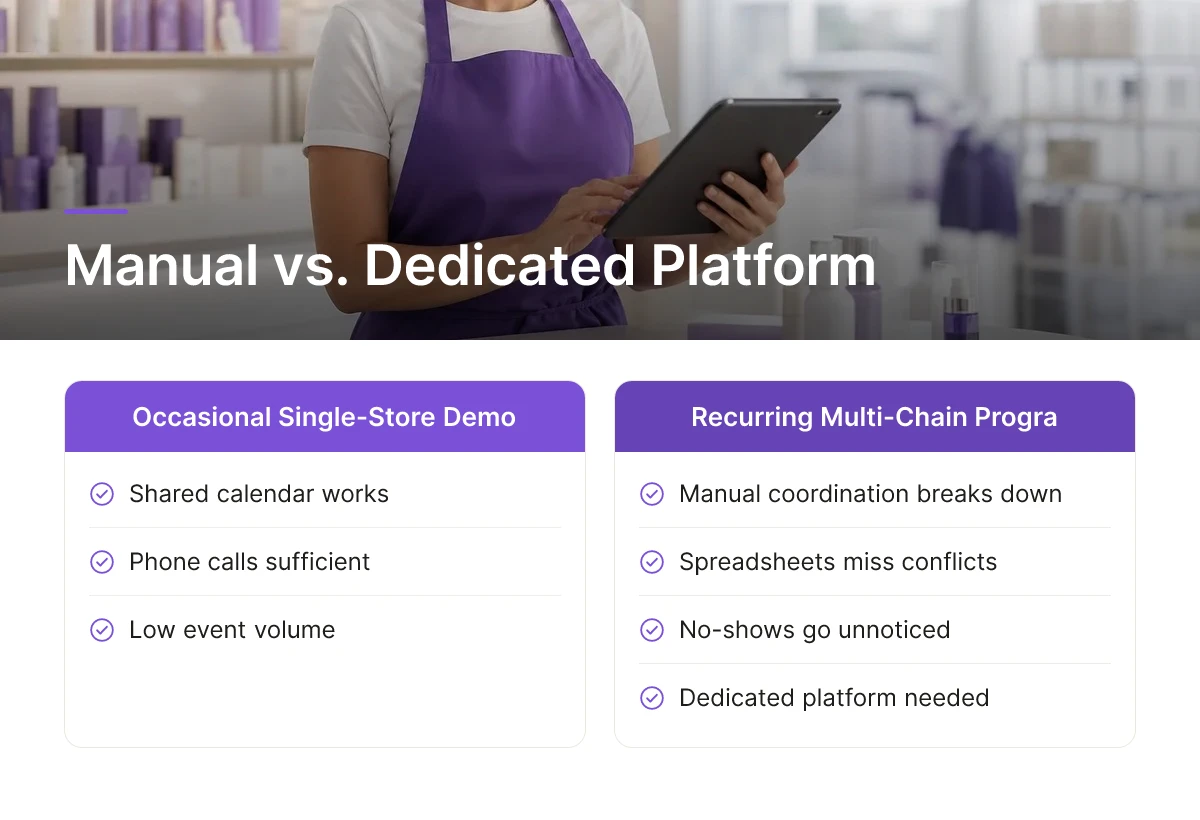
Responsibility shifts depending on the execution model each retailer requires. Club stores and mass merchants often mandate an exclusive in-house or partner agency handle all scheduling, while regional grocery chains typically let the CPG brand or its hired agency schedule directly, paying the retailer a slotting fee for the calendar spot. Independent grocers usually leave scheduling entirely to the brand or its ambassadors, with no retailer fee involved.
Most retailers expect confirmed schedules one to three weeks ahead, though club stores and mandatory-agency chains often require longer lead times for approval. Confirming earlier protects against inventory shortfalls and gives time to secure a backup ambassador if the primary one cancels.
Yes, with the right platform, one coordinator can realistically run hundreds of monthly demos without adding headcount. Demo Wizard is built for exactly this scale, consolidating scheduling, ambassador assignment, payroll, and performance tracking into one system so a single person isn't juggling spreadsheets and phone calls across dozens of markets.
A no-show without a backup plan means an empty table, wasted inventory, and a missed sales opportunity for that shift. Coordinators who track ambassador availability and performance in one system can usually identify and reassign a nearby backup ambassador quickly, rather than discovering the gap only after the store calls to ask where the demo team is.
Beyond a calendar view, look for mobile check-in with photo or geolocation confirmation, built-in compliance checklists, self-service rescheduling for ambassadors, and reporting that store, brand, and distributor teams can each access directly. The strongest test is whether the platform removes coordination work from store staff entirely, rather than simply digitizing the same phone calls and emails.

Scheduling and tracking demo staff across dozens or hundreds of stores breaks down fast when it runs on spreadsheets and phone calls. The brands that scale successfully treat ambassador assignment, payroll, and performance data as one connected process, not three separate headaches. Confirm schedules early, keep a backup ambassador ready for every shift, and measure which stores and time slots actually move product so budget follows results, not guesswork.
If your team is still coordinating demos by email and spreadsheet, start by mapping one month of activations into a single calendar view, that single step usually reveals where the scheduling gaps and no-show risks already live.
For Personnel, HR, and Dispatch | crewOS Field Service Management Software
How to find the best staff scheduling software | Blog | Bullhorn
Employee Scheduling Software to Cut Labor Costs 11% | Workforce.com
Explore more from our content library:
About the Author
Written by the SaaS / Retail Marketing Technology experts at Demo Wizard. Our team brings years of hands-on experience helping businesses with SaaS / Retail Marketing Technology, delivering practical guidance grounded in real-world results.
Demo Wizard is the Ultimate Store Sampling & Demonstration management software for Brick and Mortar Retailers and CPG Vendors.
Chat with usPhone