
Demo Wizard is the Ultimate Store Sampling & Demonstration management software for Brick and Mortar Retailers and CPG Vendors.
Chat with us

Phone
Copyright © 2026 Demo Wizard

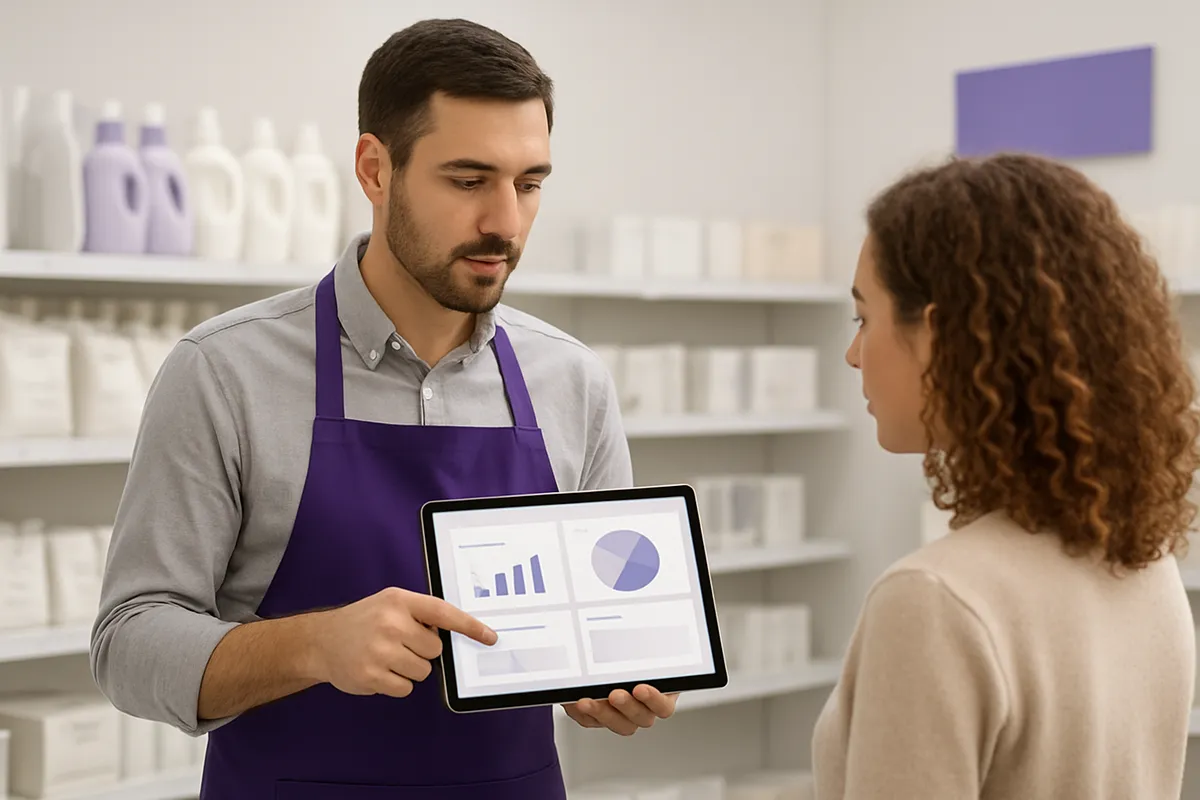
Retailers use automated management platforms to transfer the administrative burden of in-store sampling directly onto CPG vendors. By replacing manual approvals, scheduling conflicts, and execution tracking with automated retailer-controlled portals, grocery teams eliminate internal labor overhead, maintain full store policy control, and force vendors to self-manage their event logistics.
In-store demonstration management software cuts retailer overhead by shifting the administrative work of requesting, scheduling, and staffing demos onto the brands that run them. Instead of store employees fielding phone calls and emails from vendors, brands self-book open slots through a retailer-controlled portal, provision their own ambassadors, and manage sample logistics themselves. The retailer keeps simple approval controls and full visibility into a centralized calendar, without doing the coordination legwork.
In-store demonstration management software is the system a retailer and a brand both use to request, approve, and schedule a demo without a single phone call between them.
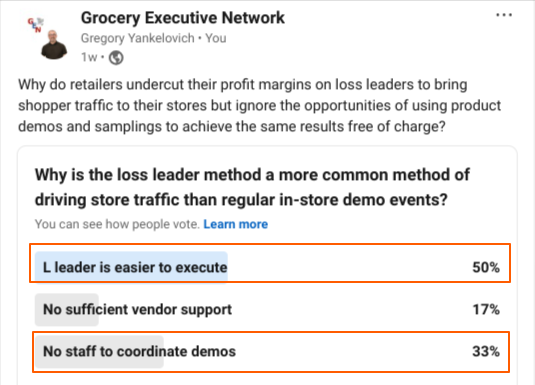
For grocery retailers fielding dozens of vendor requests a week, that matters because the coordination burden has historically landed on store staff, not on the brands who benefit most from the activation.
Brands run in-store demos to drive trial and sales velocity, products featured in retail demos often sell more than 40% better than non-sampled items [2]. A shopper who tastes or tries a product at the point of decision is far more likely to buy it than one who only sees it on a shelf [1]. That's the brand's incentive. A deeper look at how these activations are structured to drive sales is covered in this guide to in-store activations for CPG brands [Kontrol Media].
Retailers have a different but compatible reason to say yes. A well-run demo pulls foot traffic into an aisle, lifts basket size for the day, and adds energy to the store that a static shelf display can't [1]. The retailer isn't doing the brand a favor by hosting a demo. It's a trade: the brand gets a trial, and the store gets velocity. But that trade only works if the coordination required to make it happen doesn't eat up staff time on either side.
That's the gap in-store demonstration management software closes. It gives both parties a shared system for requesting, approving, and tracking activations without the back-and-forth that normally fills that gap.
The core workflow is simple: a brand submits a request against slots the retailer has already opened on a calendar, the retailer approves or declines, and the brand handles everything after that. No store manager is drafting a schedule or chasing a broker for ambassador details. The retailer's job shrinks to a yes-or-no decision and a glance at a shared calendar.
That's a different job than what a point-of-sale or inventory system does. POS platforms track checkout transactions, stock levels, and shopper purchase data. In-store demonstration management software tracks none of that. It coordinates people and time slots, the brand, its brand ambassadors, and sometimes a distributor or broker acting on the brand's behalf. It has nothing to do with scanning items or managing SKUs on a shelf.
It's also worth being precise about what stays with the brand. The retailer approves the slot and keeps visibility into the calendar, but never touches ambassador staffing or sample logistics directly. Booking the ambassador, making sure the product arrives on time, and handling any day-of-staffing issue all remain the brand's responsibility. Demo Wizard, for example, is built around that division: brands self-book through a retailer-controlled portal, provision their own ambassadors, and manage sample delivery, while the retailer's only task is approving the request and watching a centralized schedule.
One more distinction matters. This category of software is not a consumer engagement or messaging tool. It doesn't track shoppers, collect their data, or communicate with anyone walking through the store. It coordinates the people running the event, brands, ambassadors, distributors, and brokers, not the shoppers sampling the product.
Self-service booking lets a brand coordinator see open demo slots at a store and reserve one instantly, cutting out the calls and emails that used to stall every request.
In the old model, a brand representative had to reach a category manager or store manager directly to ask what dates were open, then wait for a reply, then confirm again once a broker or distributor signed off. With open-slot visibility built into in-store demonstration management software, that waiting disappears. The brand sees a live calendar for each participating store, picks a date that fits the sampling plan, and the slot is locked in without anyone picking up a phone.
Automated approval routing handles the next step that used to create friction. Instead of a request bouncing between the brand, a broker, a distributor, and a store manager, each adding their own delay, the system sends the request to the right approver automatically and logs the decision. Attack! Marketing's guide to retail demos notes that logistics and scheduling timing are some of the most common failure points in demo programs [2], and most of that friction comes from exactly this kind of manual handoff. Their broader strategy guide on scaling in-store demos covers these failure points in more depth [Attack! Marketing].
One coordinator can manage demo requests across dozens of stores and several markets at once, because the software matches ambassadors to open slots instead of a person doing it by hand. Rather than cross-referencing spreadsheets to see who's available in which region, the coordinator sets parameters once, territory, product category, certification requirements, and the system fills gaps as new slots open. This is what lets a brand scale from a handful of stores to hundreds of monthly events without hiring additional coordinators to keep pace.
Automation removes the duplicate data entry and repeated confirmations that cause scheduling errors and last-minute cancellations. When a date is booked once in a shared system, there's no second email confirming it, no separate call to the store to double-check, and no risk that a broker's spreadsheet says one thing while the store's calendar says another. Fewer handoffs mean fewer chances for a demo to fall through, a dropped confirmation used to mean an ambassador showing up to a store that had no record of the booking, or a store expecting a vendor who never got the memo. Replacing that chain of calls and emails with a single shared calendar is the practical difference between a program that scales and one that stalls at a dozen stores.
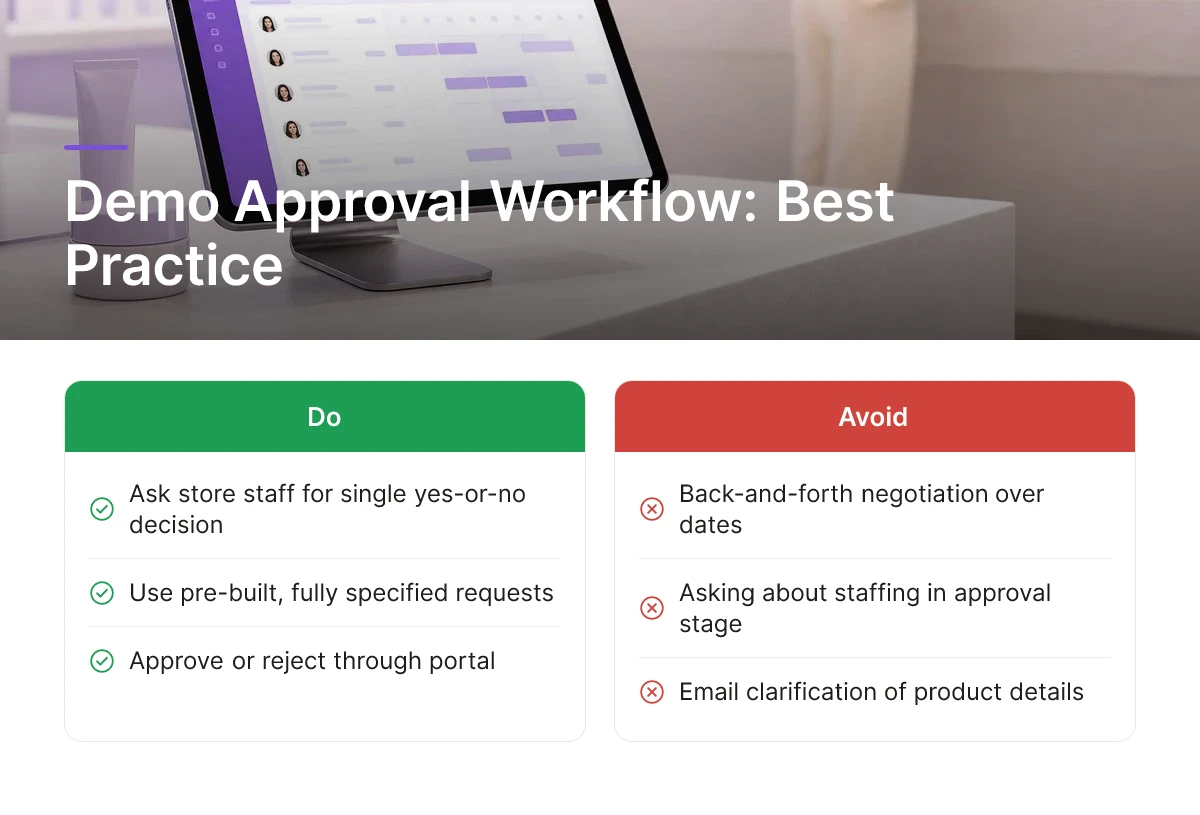
The right workflow asks store staff for a single yes-or-no decision on a pre-built request, not a round of back-and-forth about dates, staffing, or table space.
That distinction matters more than any other feature on a retailer's checklist. A negotiation process, where a store manager has to counter-propose times, ask about staffing, or clarify product details over email, turns every demo into a small project. An accept/decline model flips that: the brand or its agency submits a fully specified request through the retailer's portal, and the only job left for the store is to approve or reject it. Good in-store demonstration management software is built around this one principle, because it's the difference between a five-second decision and a ten-minute phone call repeated dozens of times a month.
Mobile access matters here for one group only: the ambassadors showing up to run the demo, not the shoppers they're sampling to. When an ambassador checks in against an approved, visible time slot from a phone, the store gets a confirmed match between who was scheduled and who actually arrived. That check-in record also gives the retailer a simple way to flag no-shows or late arrivals without assigning anyone to track it manually. The point isn't shopper-facing technology on the floor; it's a lightweight field tool that keeps the schedule honest. This mirrors how self-service kiosks reduce staff involvement in other retail touchpoints, letting shoppers and field staff move through a process without pulling in an employee at every step [Star Micronics].
A centralized calendar lets store staff, the brand, the distributor, and the broker all see the same confirmed schedule, so nobody has to call or email to confirm who's showing up and when. Today, that confirmation usually happens through scattered messages between a broker, a regional manager, and whichever employee happens to be at the front desk that week [1]. A shared calendar replaces that chain with one source of truth. If a distributor needs to check whether Saturday's slot is still open, or a broker wants to confirm an ambassador's arrival time, the answer is already visible, nobody needs to interrupt a cashier or department lead to find out.
Compliance is the other piece retailers should expect the system to handle automatically rather than checking by hand. Store hours, footprint limits, insurance documentation, and vendor requirements can all be built into the approval step itself, so a request that violates one of those conditions never reaches a human decision-maker in the first place [2]. That removes a layer of manual verification that otherwise falls to store managers who have inventory, staffing, and customers competing for the same attention.
Together, these pieces eliminate the disruption CPG vendors have traditionally created for store employees. Ambassadors arrive against a slot that's already been approved, already compliant, and already visible to everyone who needs to know about it, not a verbal agreement someone has to remember or re-confirm at the door.
Bundling ambassador assignments and sample tracking into one booking record removes the per-store coordination work that otherwise grows right alongside the campaign. Once brands can provision their own ambassadors and manage inventory inside the same system they use to book the demo, adding another ten doors costs almost nothing in coordinator time.
When a brand needs to staff a demo, the traditional path routes through retailer staff, who have to confirm availability, relay scheduling constraints, and chase down coverage for call-outs. That works fine for three stores. It breaks down at thirty. Letting brands assign and manage their own ambassadors directly inside the platform, matching availability to store needs, swapping coverage when someone cancels, removes a bottleneck that otherwise requires a store employee or regional manager to get involved every time a shift changes hands.
Mismatched inventory is one of the most common reasons a demo underperforms: product arrives late, the wrong case count shows up, or a store runs out mid-shift with no one tracking it. When sample logistics live in the same booking record as the ambassador assignment and the approval, a coordinator can see delivery status, case counts, and shift details in one place instead of making follow-up calls to three different people to confirm the same shipment. That single view is what cuts the manual check-ins that eat a coordinator's week.
Roadshow-style activations raise the stakes considerably. A pop-up footprint running three to ten days needs ambassador coverage across multiple shifts, inventory staged to last the full run, and daily check-ins to catch problems before they cost a weekend's momentum. Coordinating that by phone and spreadsheet across even a handful of locations is a full-time job. Keeping booking, staffing, and inventory tracking inside one system is what makes a multi-day footprint repeatable across dozens of stores rather than a one-off that only works with close supervision.
The savings don't come from a specific price point, they come from avoiding dedicated coordinator hours per store. Every manual phone call, status check, or re-confirmation is labor cost that scales with door count unless the system absorbs it. In-store demonstration management software that handles provisioning and sample tracking in one place is what lets a brand run a budget-friendly pilot in ten stores and scale to an enterprise-level footprint without hiring proportionally more coordinators.
Brands and retailers judge demo success by watching sales velocity and basket size shift during the event window, combined with execution data the platform tracks directly.
Neither party needs a cash register feed to know whether a demo worked. Grocery retailers already track how fast a product moves off the shelf, and a well-run demo should produce a visible bump against the baseline. The data just needs to be compared before, during, and after, not captured in real time at checkout. The same logic applies to other self-service retail formats, where the value shows up in shopper behavior and throughput rather than a single integrated data feed [Kiosk Marketplace].
Sales velocity, units sold per store per week, and average transaction value, or basket size, are the two metrics that matter in brick-and-mortar [2]. "Conversion rate" is an ecommerce term built around sessions and clicks; it doesn't map cleanly onto a shopper walking past an end cap. A product that moves from eight units a week to twenty-two during a weekend roadshow tells a retailer something concrete, and so does a jump in basket size when shoppers who sample a sauce also pick up pasta and cheese on the same trip.
Demo Wizard can ingest sales data supplied by the retailer or by a third-party data provider to run lift analysis against those baselines. It does not connect directly to point-of-sale systems. That distinction matters: the platform's job is coordinating the event, scheduling, ambassadors, samples, not acting as a retail analytics suite plugged into the register.
The practical cost metric for brands and agencies is cost per demo, calculated from ambassador hours and samples used, tracked per event rather than pulled from a sales terminal. This is where in-store demonstration management software earns its keep, because it captures the inputs automatically instead of relying on a coordinator's spreadsheet.
On the execution side, the platform natively tracks:
Those three data points, paired with ambassador pay for the shift, produce a reliable cost-per-demo figure without needing a register transaction in sight.
Each event generates a demo recap that rolls these signals into a single record, slot status, check-in time, samples distributed, and any notes the ambassador logs on the floor. That recap becomes the evidence a brand brings back to a retail buyer to justify renewing or expanding a program. For a retailer, it's also the proof that a vendor's activation is being run professionally, not just promised on paper. Neither side needs a complicated analytics stack to see that the numbers add up. The underlying principle holds across self-service retail formats more broadly: giving a customer or field partner a self-directed workflow, backed by a clear record of what happened, tends to free up staff time without sacrificing accountability [DCR POS].

No, ambassador scheduling stays with the brand or its agency, not the retailer's staff. In-store demonstration management software like Demo Wizard lets brands assign and manage their own ambassadors, so your team's only job is reviewing and approving the request. Store employees never coordinate shifts, confirm availability, or chase down ambassador contact details.
It should fit alongside your existing calendar and communication tools, not replace your point-of-sale or inventory systems. The priority is a shared view of scheduled activations that store managers, brokers, and brand teams can all see without integrating deeply into core retail infrastructure. Simpler connections mean faster adoption across multiple store locations.
No, these are distinct categories built for different jobs. A point-of-sale or inventory system tracks transactions and stock levels, while in-store demonstration management software coordinates scheduling, ambassador assignments, and approval workflows for sampling events. The two can inform each other, but one doesn't replace the other.
Self-booking shifts the administrative work to the brand, freeing store staff from fielding phone calls and emails to arrange demo dates. Managers keep control through approval settings while avoiding scheduling conflicts, double-bookings, and the back-and-forth that normally eats into a workday. The result is a fuller, better-organized demo calendar with far less staff time spent managing it.
Yes, the self-service model is especially useful for brands without a dedicated field marketing department. A single coordinator can book slots, assign ambassadors, and track samples across multiple stores through one portal instead of juggling emails and spreadsheets. That makes the software accessible to smaller teams running a handful of monthly demos, not just large CPG organizations with full coordination staff.
Independent grocers don't need more software to manage, they need less administrative work tied to demos that aren't even run by their own staff. Self-service booking, retailer-side approval controls, and brand-managed ambassador logistics move that burden back where it belongs: with the CPG brands and agencies requesting the shelf space and foot traffic. The store's role shrinks to a quick approval and a glance at the calendar.
If demo requests currently arrive by phone, email, or a sticky note on the manager's desk, start by asking your most active CPG vendors whether they already use a platform like Demo Wizard, you may be one approval setting away from eliminating the back-and-forth entirely.
Explore more from our content library:
About the Author
Written by Gregory Yankelovich. This article was conceptualized, directed, and reviewed by our human team of retail marketing veterans. Every strategy, framework, and recommendation originates from the hands-on expertise of our experts. Human insight drives the core narrative, ensuring all advice remains grounded in real-world retail execution. AI assistance was used to streamline production and optimize for generative engine optimization (GEO).
Demo Wizard is the Ultimate Store Sampling & Demonstration management software for Brick and Mortar Retailers and CPG Vendors.
Chat with usPhone